How do we teach our kids to handle their money, when so many of us are struggling ourselves? Many homeschool families like to take on this challenge as part of their learning lifestyle. After all, you're never too old to learn how to save, invest, and spend wisely!
Recently, the San Jose Mercury News ran an article entitled, "Websites teach kids how to manage their money." The article included a list of websites aimed at kids, teens, and families for learning about and discussing finances. Here are some of my favorites from that list.
The Mint: This website has tabs for kids, teens, parents, and teachers. From savings and investing to decoding paychecks and tracking spending, The Mint covers many of the areas other websites, and certainly traditional financial education, neglect.
Kidnexions: This commercial site does sell books and software, but it also offers many free financial videos. Your kids (and you) can learn about the Rule of 72 (not even all bankers know this!), how compound interest works, and how to set financial goals.
U.S. Mint Kids: Is your child fascinated with all things "money"? The U.S. Mint's site for kids is filled with games, cartoons, and information about how money is designed and created. Learn about what the Mint does, how to collect coins, even facts about the U.S. Presidents and branches of government.
If your child is also in Cub Scouts, these websites can help with the Collecting, Mathematics, and Video Games belt loops and pins.
A strong financial education is one of the best gifts you can give to your child and yourself. Learn how your money works and how to make it work for you.
Article by Sarah J. Wilson
Showing posts with label free website. Show all posts
Showing posts with label free website. Show all posts
Sunday, September 25, 2011


Tuesday, July 12, 2011
Organize Your Homeschool with Collaborize Classroom
Looking for a new way to organize your homeschool? Perhaps you're running a co-op class or two, and want to engage your students between meetings? Maybe you want to encourage your student to explore new ideas and information, but meet with resistance when doing so one-on-one?
 Collaborize Classroom, a free online learning platform from Democrasoft, might just be the tool you need to make your homeschooling experience more enjoyable and successful.
Designed for traditional classrooms, Collaborize Classroom easily lends itself to the homeschool environment. Whether you want to posit questions for your student to write about or you want to involve many students in discussions, voting, or collaboration, you can do it all with Collaborize Classroom.
Collaborize Classroom also will send you a weekly update on the progress of your students. You can see what they're working on, what they've missed, and adjust your homeschool plan accordingly.
Another good use of Collaborize Classroom is sharing information. For example, as homeschoolers, we come across endless recommendations for websites, books, and games to enhance our students' learning experiences. Instead of telling your student about them or emailing them, start a "discussion" about them. Your student can check out the resource, write about it, vote on favorites, and better take control of his or her own education.
If you're running a co-op class, especially one with an academic bent, Collaborize Classroom is ideal for keeping students immersed in the learning process between meetings. They can work together on projects, share infomation, ask questions, follow up on ideas presented in the class, and more, all in a private and safe environment.
Click here to more about Collaborize Classroom. You can also learn more on Facebook and Twitter. You can sign up for your free account (which Collaborize Classroom promises will always remain free) here.
Article by Sarah J. Wilson
 Collaborize Classroom, a free online learning platform from Democrasoft, might just be the tool you need to make your homeschooling experience more enjoyable and successful.
Designed for traditional classrooms, Collaborize Classroom easily lends itself to the homeschool environment. Whether you want to posit questions for your student to write about or you want to involve many students in discussions, voting, or collaboration, you can do it all with Collaborize Classroom.
Collaborize Classroom also will send you a weekly update on the progress of your students. You can see what they're working on, what they've missed, and adjust your homeschool plan accordingly.
Another good use of Collaborize Classroom is sharing information. For example, as homeschoolers, we come across endless recommendations for websites, books, and games to enhance our students' learning experiences. Instead of telling your student about them or emailing them, start a "discussion" about them. Your student can check out the resource, write about it, vote on favorites, and better take control of his or her own education.
If you're running a co-op class, especially one with an academic bent, Collaborize Classroom is ideal for keeping students immersed in the learning process between meetings. They can work together on projects, share infomation, ask questions, follow up on ideas presented in the class, and more, all in a private and safe environment.
Click here to more about Collaborize Classroom. You can also learn more on Facebook and Twitter. You can sign up for your free account (which Collaborize Classroom promises will always remain free) here.
Article by Sarah J. Wilson
Monday, May 2, 2011
BBC Typing
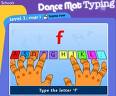
If you have a child who is learning to type, check out BBC's Dance Mat Typing before you buy any software. This is a free typing program available online and perfect for elementary aged students who are learning to type.
Rock-and-roll animals guide you through learning each of the letters in Flash animation. After learning the position of the letters, you practice lines of typing, as a little record "breaks" at the end of each line of type. Every few lines is another encouraging animation. If you make a mistake, the correct letter on the pictured keyboard calls out, "Me, me!"
Only a few letters are introduced at a time and the practice is mostly real words, not lines of random letters. The letters you have learned are shown in bright colors and are color coded with a different color for each finger.
Your child will need to remember what lesson he or she is on, there's no login so the computer doesn't save the information for you. Sometimes the guides are a bit difficult to understand because they have a strong accent, but this never seemed to bother my son. All the lowercase letters and the shift key are introduced, but not the numbers and extra symbols or tabs.
The website is a great introduction to typing for a beginner. My son can now touch type and is building speed by actually typing the things he is writing.
Rock-and-roll animals guide you through learning each of the letters in Flash animation. After learning the position of the letters, you practice lines of typing, as a little record "breaks" at the end of each line of type. Every few lines is another encouraging animation. If you make a mistake, the correct letter on the pictured keyboard calls out, "Me, me!"
Only a few letters are introduced at a time and the practice is mostly real words, not lines of random letters. The letters you have learned are shown in bright colors and are color coded with a different color for each finger.
Your child will need to remember what lesson he or she is on, there's no login so the computer doesn't save the information for you. Sometimes the guides are a bit difficult to understand because they have a strong accent, but this never seemed to bother my son. All the lowercase letters and the shift key are introduced, but not the numbers and extra symbols or tabs.
The website is a great introduction to typing for a beginner. My son can now touch type and is building speed by actually typing the things he is writing.
Saturday, March 19, 2011
Free Paper Toys from The Toymaker
The Toymaker website is full of beautiful, clever, and completely free paper toys to make. Created by artist Marilyn Scott Waters, each folded or cut toy is printed from a pdf file onto your own paper. You do the cutting and the folding and sometimes gluing of specific pieces. Some are quite detailed and take a careful hand, others are easier for younger hands. The pieces are usually well marked so you can figure out what goes where. You may wish to make some for younger children while older children may want to do the cutting themselves. These toys will appeal to kids and adults with whimsical tastes.
Some of our favorites include the Penny Butterfly, the Marble Mice, and the Window to Fairyland. We've also enjoyed a number of the holiday items (not all are toys, really). Just browsing the toys and reading the quotes on each page is a treat in itself.
We often print the toys on light cardstock to make a more sturdy toy. Use a good quality glue if you use cardstock because glue sticks just don't seem to stay stuck.
Some of our favorites include the Penny Butterfly, the Marble Mice, and the Window to Fairyland. We've also enjoyed a number of the holiday items (not all are toys, really). Just browsing the toys and reading the quotes on each page is a treat in itself.
We often print the toys on light cardstock to make a more sturdy toy. Use a good quality glue if you use cardstock because glue sticks just don't seem to stay stuck.
Sunday, March 6, 2011
Learning Fact Families
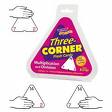
One of the great ways to learn addition and subtraction facts or multiplication and division facts is to memorize not the facts but the "fact families." For example, in addition/subtraction the numbers 3, 5, and 8 form a fact family with the following facts: 3+5=8, 5+3=8, 8-3=5, and 8-5=3. In multiplication/division an example family for the numbers 4, 5, and 20 would be: 4x5=20, 5x4=20, 20/5=4, 20/4=5. Fact families are great because by memorizing that three numbers have a relationship to each other, you actually memorize four facts. Many of us have done this informally and will almost expect to see the third number of a fact family when faced with the other two numbers.
There are commercial three sided flash cards available from Trend. But for a lower cost alternative, here is a great page from Math Cats with fact family cards you can print yourself, a nifty holder for them which covers up part of the card, and many games for both addition/subtraction and multiplication/division.
Try fact families especially with kids who are good at seeing relationships between information and for those who haven't been successful with regular flash cards.
Article by Heddi Craft
There are commercial three sided flash cards available from Trend. But for a lower cost alternative, here is a great page from Math Cats with fact family cards you can print yourself, a nifty holder for them which covers up part of the card, and many games for both addition/subtraction and multiplication/division.
Try fact families especially with kids who are good at seeing relationships between information and for those who haven't been successful with regular flash cards.
Article by Heddi Craft
Saturday, March 5, 2011
Did You Know Your Library Offers . . .
This column began with an email. Lorraine at the San Jose Libraries stumbled across an old column of mine and thought I might write an article about free services her library provides.
Apparently, libraries want to reach out to homeschoolers, but many find our community difficult to reach. It’s not like we all meet in one special location or wear pins identifying ourselves or even have a secret handshake. While individual librarians and individual branches may know individual homeschoolers, the people charged with marketing the libraries’ free services are not necessarily out on the floors finding us.
Well, the idea blossomed from a column to a regular section in California HomeSchooler. Lorraine worked to notify librarians throughout California of our idea, and their emails came pouring in. Seems we are a desired group!
Take a moment to find your local library on the list below. If you find them, go visit and use the services. (Did I mention they’re FREE?) Tell them you saw them listed on Homeschool Review. If you don’t see your local library, go visit them and tell them that you would love to learn more about what they offer and share it with other homeschoolers. They, or you, can contact me at MynyddPreparatory@hotmail.com. I look forward to hearing from them and you.
Note 1: Unless otherwise indicated, services offered are for card-holders of the library listed (except storytimes and book clubs).
Note 2: Services listed are a minute fraction of what each library offers. Visit your library in person or online to see the bounty of resources available to your community. As Margaret at SLO Library put it, “We would love it if homeschool families would ask us for more help!”
Benicia Public Library
Read to a Dog: once a week, children have the opportunity to read to a dog (much more fun than reading to an adult!)
Book Clubs: grades 2-3, grades 4-5, grades 6-8, and teen; each club meets once a month
In response to a family's request last winter, taught a 5-session course to homeschooled children about Internet safety and word processing
Burlingame Public Library
Tutor.com Learning Suite: serves K-12, college students and adults with one-to-one online tutoring and homework help services, plus has expanded programs to help adults who find themselves searching for jobs and writing resumes.Tell Me More: language learning software
Corona Public LibraryBrainFuse: online homework and subject help from expert tutors (English and Spanish)
Online version of the World Book Encyclopedia
El Dorado County Library
Library ELF (Eliminate Library Fines): Emails list of books to patrons three days before due date; sends second reminder one day before due date; notice includes calendar of when all checked-out books are due
Escondido Public LibraryHelpNow by BrainFuse: online homework help for grades 3-12; one-to-one tutoring in math, science, social studies and language arts; available daily from 1:00 - 10:00 p.m. in English and Spanish
Hayward Library
Afterschool Homework Centers: onsite tutoring, Monday through Thursday during the school year, with trained tutors
Tutor.com: online live tutors, available year-round, either from a home connection or laptops at the library
[County of] Los Angeles Public Library
Live Homework Help: live assistance in English, math, social studies, and science. Services include live tutoring, many online tutorials and resources, as well as assistance in GED studies, resume writing, report writing, etc.
Mono County Libraries
Tutor.com: online tutoring service available in the libraries and from homeBilingual (English & Spanish) storytime: 10:30 a.m. Wednesdays and Saturdays at the Mammoth Lakes Branch
Monterey County Free Libraries
Homework Help Centers: one-on-one help, afterschool, from paid homework center coordinators
Kids’ Book Clubs: children discuss books they read, draw alternate covers, etc.Vietnamese Classes: from beginners on up (Marina Branch)
San Diego City Library
Check out passes to the Children’s Museum
San Francisco Public Library
Rosetta Stone online
Library cards issued in person to any California resident with valid California ID.
San Jose Library
LearningExpress Library: online courses, practice tests (including ACT, SAT, GED, ASVAB, Firefighter, Police Officer, Paramedic, EMT Basic, U.S. Citizenship, Postal Worker, Cosmetology, and Real Estate Agent & Broker exams)Live Homework Help: online tutoring for kindergarten through second-year college
San Luis Obispo County Library
Tumblebooks: online animated books, classics, comprehension quizzes, and games in multiple languagesMango Language instruction (like Rosetta Stone)Social Studies Fact Cards: info. about every state, country, president, ancient cultures, CA missions, etc.Facts on File Database: provides in-depth information about current events, historical events, and country informationDownloadable audiobooks for ipods or MP3 players
Santa Clara City LibraryLINK: Free interlibrary loans between local library systems
Santa Cruz Public LibrariesDial-A-Story: kids can listen to a story on the phone (831-429-5780)Chess Club: at the Central and Aptos branchesProctoring Exams: closed book, open book, and online exams (arrangements must be made in advance with either the Youth Services staff or Reference Supervisor)
Sonoma County Library
Book clubs for school-aged children
CultureGrams: includes a photo gallery, recipe collection, database of famous people, and data tables; read topics, explore maps and flags, and use the convenient search feature.
Wildlife Encyclopedia: includes descriptive articles, photos, and maps of habitat areas of animals around the world.teenspace blog: teen book reviews, award winners and other reading lists, and other great resources for middle schoolers and high schoolers
Now, you may ask, “What can I do for my library?” Simply put, use their services. Usage is tracked, and underutilized programs are the first to be cut. Don’t think about going. GO!
Article by Sarah J. Wilson
Apparently, libraries want to reach out to homeschoolers, but many find our community difficult to reach. It’s not like we all meet in one special location or wear pins identifying ourselves or even have a secret handshake. While individual librarians and individual branches may know individual homeschoolers, the people charged with marketing the libraries’ free services are not necessarily out on the floors finding us.
Well, the idea blossomed from a column to a regular section in California HomeSchooler. Lorraine worked to notify librarians throughout California of our idea, and their emails came pouring in. Seems we are a desired group!
Take a moment to find your local library on the list below. If you find them, go visit and use the services. (Did I mention they’re FREE?) Tell them you saw them listed on Homeschool Review. If you don’t see your local library, go visit them and tell them that you would love to learn more about what they offer and share it with other homeschoolers. They, or you, can contact me at MynyddPreparatory@hotmail.com. I look forward to hearing from them and you.
Note 1: Unless otherwise indicated, services offered are for card-holders of the library listed (except storytimes and book clubs).
Note 2: Services listed are a minute fraction of what each library offers. Visit your library in person or online to see the bounty of resources available to your community. As Margaret at SLO Library put it, “We would love it if homeschool families would ask us for more help!”
Benicia Public Library
Read to a Dog: once a week, children have the opportunity to read to a dog (much more fun than reading to an adult!)
Book Clubs: grades 2-3, grades 4-5, grades 6-8, and teen; each club meets once a month
In response to a family's request last winter, taught a 5-session course to homeschooled children about Internet safety and word processing
Burlingame Public Library
Tutor.com Learning Suite: serves K-12, college students and adults with one-to-one online tutoring and homework help services, plus has expanded programs to help adults who find themselves searching for jobs and writing resumes.Tell Me More: language learning software
Corona Public LibraryBrainFuse: online homework and subject help from expert tutors (English and Spanish)
Online version of the World Book Encyclopedia
El Dorado County Library
Library ELF (Eliminate Library Fines): Emails list of books to patrons three days before due date; sends second reminder one day before due date; notice includes calendar of when all checked-out books are due
Escondido Public LibraryHelpNow by BrainFuse: online homework help for grades 3-12; one-to-one tutoring in math, science, social studies and language arts; available daily from 1:00 - 10:00 p.m. in English and Spanish
Hayward Library
Afterschool Homework Centers: onsite tutoring, Monday through Thursday during the school year, with trained tutors
Tutor.com: online live tutors, available year-round, either from a home connection or laptops at the library
[County of] Los Angeles Public Library
Live Homework Help: live assistance in English, math, social studies, and science. Services include live tutoring, many online tutorials and resources, as well as assistance in GED studies, resume writing, report writing, etc.
Mono County Libraries
Tutor.com: online tutoring service available in the libraries and from homeBilingual (English & Spanish) storytime: 10:30 a.m. Wednesdays and Saturdays at the Mammoth Lakes Branch
Monterey County Free Libraries
Homework Help Centers: one-on-one help, afterschool, from paid homework center coordinators
Kids’ Book Clubs: children discuss books they read, draw alternate covers, etc.Vietnamese Classes: from beginners on up (Marina Branch)
San Diego City Library
Check out passes to the Children’s Museum
San Francisco Public Library
Rosetta Stone online
Library cards issued in person to any California resident with valid California ID.
San Jose Library
LearningExpress Library: online courses, practice tests (including ACT, SAT, GED, ASVAB, Firefighter, Police Officer, Paramedic, EMT Basic, U.S. Citizenship, Postal Worker, Cosmetology, and Real Estate Agent & Broker exams)Live Homework Help: online tutoring for kindergarten through second-year college
San Luis Obispo County Library
Tumblebooks: online animated books, classics, comprehension quizzes, and games in multiple languagesMango Language instruction (like Rosetta Stone)Social Studies Fact Cards: info. about every state, country, president, ancient cultures, CA missions, etc.Facts on File Database: provides in-depth information about current events, historical events, and country informationDownloadable audiobooks for ipods or MP3 players
Santa Clara City LibraryLINK: Free interlibrary loans between local library systems
Santa Cruz Public LibrariesDial-A-Story: kids can listen to a story on the phone (831-429-5780)Chess Club: at the Central and Aptos branchesProctoring Exams: closed book, open book, and online exams (arrangements must be made in advance with either the Youth Services staff or Reference Supervisor)
Sonoma County Library
Book clubs for school-aged children
CultureGrams: includes a photo gallery, recipe collection, database of famous people, and data tables; read topics, explore maps and flags, and use the convenient search feature.
Wildlife Encyclopedia: includes descriptive articles, photos, and maps of habitat areas of animals around the world.teenspace blog: teen book reviews, award winners and other reading lists, and other great resources for middle schoolers and high schoolers
Now, you may ask, “What can I do for my library?” Simply put, use their services. Usage is tracked, and underutilized programs are the first to be cut. Don’t think about going. GO!
Article by Sarah J. Wilson
Subscribe to:
Posts (Atom)